
Paragon Hard Disk Manager 17™ Business
Technician License
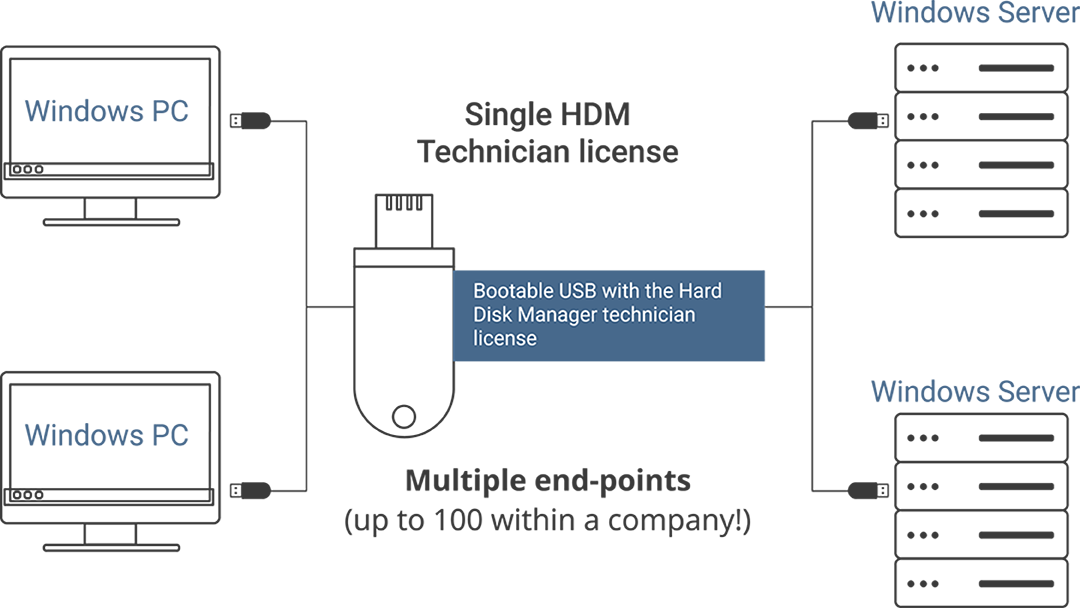
Backup & Restore your data, manage storage devices and maintain up to 100 corporate Windows end-points with a single license!
Сreate Paragon bootable media and use it as a portable software tool to service all of the corporate end-points. Request a free trial to test the main features.
Already using Hard Disk Manager Technician License? Renew now!
HDM for Business Key Features
Backup and Recovery data
- Run all backup types; perform sector- and file-level backups
- Restore entire disks and partitions
- Recover individual folders, files, and application-specific data
- Regain access to corrupted or malware-inflicted information
Migrate OS
- Move live and simply switch over
- Move to a new large-capacity storage device
- Support Windows Server 2012/2016/2019/2022/2025
- Recover in the event of a malfunction or failure
Partition disks
- Simplify the backup process by separating your data from your operating system
- Easily organize your hard drive and redistribute free space to enhance system performance
- Organize and optimize your hard disk with Create-, Resize-, Format- and Delete-partition Dialogues
Erase disks
- Permanently wipe sensitive data on partitions and disk volumes.
- 10 industry-grade data sanitization algorithms for HDD
Other Paragon Products
Solutions for Business
The robust and comprehensive set of tools for business environments of any size.
Need support?
Before submitting a ticket, check out our knowledge base.
FAQ
Find answers to the most common questions and access our documentation