
為了讓您順利使用本公司網站,我們使用了 cookie 技術。如要繼續瀏覽本網站,您必須同意讓我們使用 cookie。

詳細資訊 ››
Contact sales: 1-888-DISK-IMAGE
❯

1-888-DISK-IMAGE (1-888-347-5462)

Sales North America

+49-761-59018-202

Sales Europe

+81(3)3265-1278

Sales Japan

+7 (495) 789-6717

Sales Russia

extFS for Mac by Paragon Software

Boost your mac with extFS functionality
extFS for Mac by Paragon Software. HTML Banner.
Paragon File System Link:快速、安全、精簡。三項全選。
三項全選。

授予完全讀寫訪問!


extFS是Linux的主要文件系统之一。 如果您在Mac计算机上工作,需要从HDD,SSD或Linux下格式化的闪存驱动器读取或写入文件,则需要extFS for Mac by Paragon Software。


寫入、編輯、複製、移動或刪除直接連接在Mac上的ext2、ext3、ext4 Linux驅動上的檔案!

快速、無縫、易於使用。安裝、卸載、檢查、修復和格式化任何Linux格式分卷。

從Mac寫入檔案至Linux驅動器

無法在Mac上複製、寫入、編輯或刪除Linux格式檔案。 這僅僅是因為蘋果的macOS根本不支持Linux驅動器,甚至在只讀模式下也不支持。 extFS for Mac by Paragon Software 實現快速無限讀寫訪問ext2、ext3、ext3、ext4等格式的Linux系統驅動!
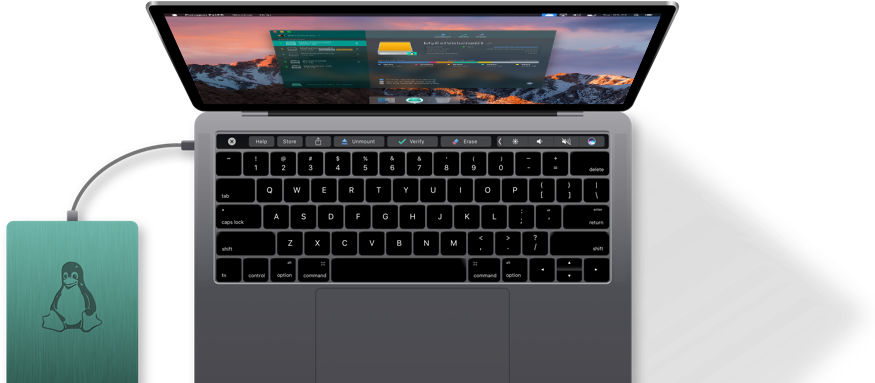
 

Get read/write access to ext2, ext3 and ext4 formatted drives on Mac.

  • I have been using extFS for Mac by Paragon Software for quite a while and did not notice any issues so far. The app is really silent, I just installed it and forgot.

    Cnet,
    cnet.com

  • Features: It does r/w ext file system – so this is the only software available under macOS. Great!
    Its easy to use – just connect your ext2 disk and go.

    MacUpdate,
    macupdate.com

  • My Mac uses dual boot, with Ubuntu. Thanks to extFS for Mac by Paragon Software, I can now work with my Linux files from macOS, just like from Linux.

    What our users say

  • A perfect solution for me, as I’m using Ubuntu with Sierra combined. And there’s no other such user-friendly program that is Sierra-compatible! 10/10

    What our users say

  • It does the trick without any hassle.

    Nancy Young

Blazing Fast

超速動力

前所未有的性能!
和本地macOS檔案系統一樣快!

Fully Compatible

完全相容

支援 macOS Golden Gate &和舊版 macOS
查詢規格

Powerful Features

功能強大

可安全傳送資料、運作順暢、使用簡易、操作無障礙

desc of picture

苹果硅M1/M2/M3/M4准备就绪

extFS for Mac by Paragon Software专为最新的Apple ARM技术而构建,与M1,M2,M3和M4Mac设备完全兼容

運作方式

只有 3 步驟,就這麼簡單

下載 Paragon extFS for Mac,然後安裝到 Mac 上。

安裝

下載 extFS for Mac by Paragon Software,然後安裝到 Mac 上。

重新啟動 Mac

重新啟動

重新啟動 Mac。

extFS volumes connected to your Mac are available in the Finder

搞定!

extFS volumes connected to your Mac are available in the Finder.
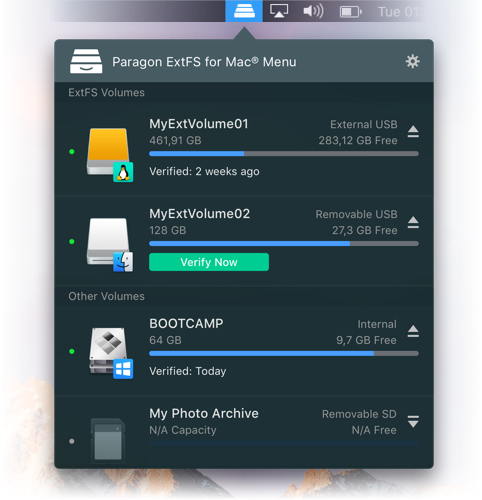
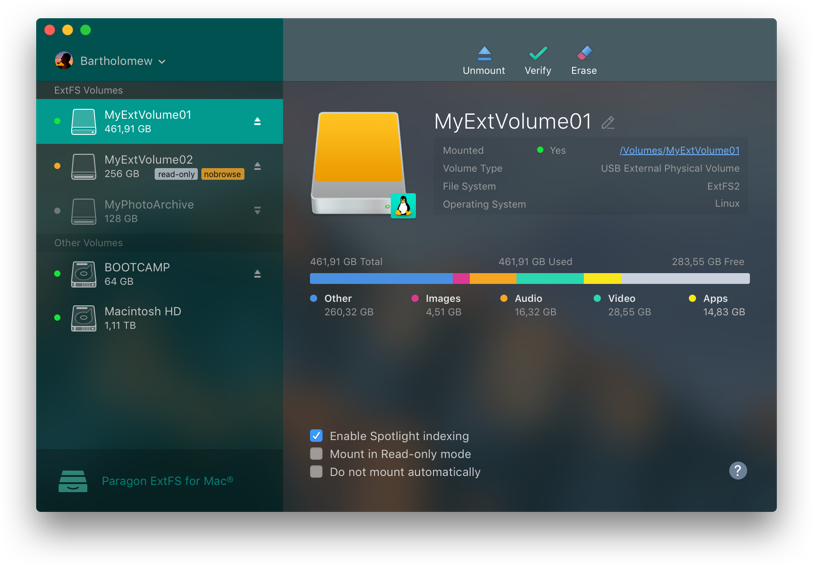
extFS for Mac by Paragon Software. Access all Linux ext2, ext3 or ext4 with extFS driver for Mac. Screenshot.

所有功能只要點滑鼠就能完成!


如果您需要的不僅僅是一個快速可靠的extFS驅動程式,我們的羽量級菜單欄以及全功能extFS for Mac by Paragon Software隨時準備為您服務。


訪問所有Linux ext2、ext3或ext4驅動器並執行最常見的卷操作,如掛載、卸載、驗證和修復。


菜單欄應用程式在設計時考慮了明暗兩種macOS模式,使其在任何一種模式下都能運行流暢,且保證良好的視覺效果。

無縫用戶體驗


出色的設計


如果您熟悉蘋果的磁片實用程式,那麼您已經知道如何在mac11中使用extFS for Mac by Paragon Software了。反之則需要一段時間才能得心應手。


extFS for Mac by Paragon Software 繼承了蘋果的磁片實用程式,通過增加Linux ext2、ext3或ext4卷操作和高級安裝選項,將其昇華至新高度。
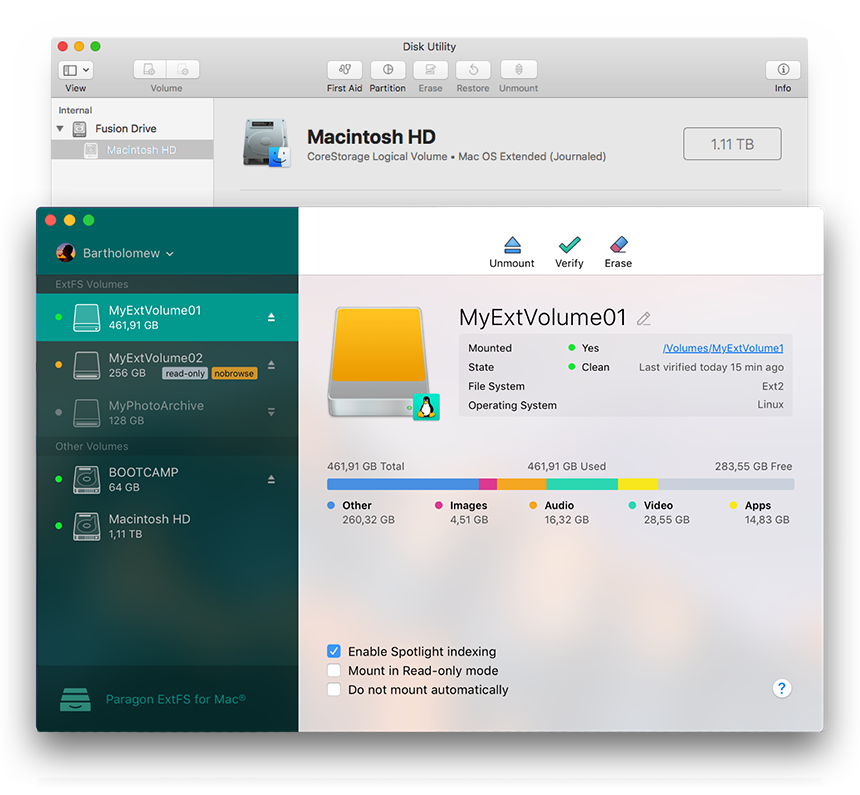
extFS for Mac by Paragon Software. Open extFS formatted drivers on Mac to work with files. Screenshot.
extFS for Mac by Paragon Software. Use Spotlight Indexing to observe free space on extFS volume. Screenshot.

安裝將在您的掌控之下進行


啟動聚焦索引。如果您想要即刻聚焦搜索,或者想要查看關於選中磁片的已使用空間的詳細情況,如應用、音樂、視頻、照片等,請選中這一項。


只讀安裝。如果您需要訪問敏感數據而不需要修改任何檔案,請選擇此選項。


不自動安裝。如果您想手動控制對卷的訪問,請選擇此選項。

特色

主要及最新功能

優勢

所支援的作業系統

  • macOS Golden Gate
  • macOS Tahoe
  • macOS Sequoia
  • macOS Sonoma
  • macOS Ventura
  • macOS Monterey
  • macOS Big Sur
  • macOS Catalina

支援的檔案系統

  • ext2
  • ext3
  • ext4

寫入權限

以寫入模式掛接磁碟區時,您可以對其中的檔案和資料夾執行所有操作:讀取、編輯、刪除、重新命名、新建。

自動掛接

extFS for Mac by Paragon Software 會在系統啟動時自動掛接支援的磁碟區,讓您每次重新啟動作業系統或電腦開機時都不必擔心。不過您可隨時在程式介面關閉這項功能。

磁碟區管理

extFS for Mac by Paragon Software 可輕鬆格式化磁碟區、檢查磁碟區完整性,以及修復毀損磁碟區。

支援各種文字

只要是作業系統支援的字母,extFS for Mac by Paragon Software 就一律支援,包括非羅馬字元和非拉丁字元,正常存取掛接在非原生作業系統磁碟區中的檔案名稱。

对LVM(逻辑卷管理)的读/写支持

使用extFS for Mac by Paragon Software,您的Linux逻辑卷管理器不会丢失任何功能。 它将能够执行打开,关闭,读取和写入操作,并且通常照常操作。

與第三方軟體相容

extFS for Mac by Paragon Software 與常見的虛擬化和加密應用程式相容,包括 VMware Fusion 和 Workstation、Parallels Desktop、TrueCrypt 以及系列產品。

支持最新的extFS功能

大多数ext4,Linux的最新文件系统格式,功能现在支持:64bit,dir_index,extent,extra_isize,ext_attr,flex_bg,has_journal等。
请注意,Paragon软件的mac extFS目前不支持bigalloc、journal_dev、meta_bg特性、metadata_csum、inline_data。

常見問題

購買前可以免費試用產品嗎?
沒問題,您可以免費試用 extFS for Mac by Paragon Software 十天。十天過後軟體會自動鎖住,必須購買授權才能啟用。
支援 macOS Golden Gate 嗎?
是的,extFS for Mac by Paragon Software 支援最新版 macOS。
如果我買舊版的 extFS for Mac by Paragon Software,要如何更新?
請前往您的 Paragon Licensing Center 帳戶。如果更新版上架,您就能從那裡下載。
「完整的讀取/寫入存取權限」是指哪些操作?
您可以執行一般的建立/讀取/修改/複製/刪除操作。
如果我的macOS版本早于10.15Catalina,该怎么办?
如果您的macOS版本是10.12-10.15,请按照以下步骤操作:

  1. 解除安裝 Paragon extFS for Mac。
  2. 重新啟動 Mac。
  3. 從 Paragon Licensing Center 帳戶下載 Paragon extFS for Mac 14。
  4. 執行安裝程序。
  5. 重新啟動 Mac。

如果您的macOS版本早于10.10,请按照以下步骤操作:

  1. 解除安裝 Paragon extFS for Mac。
  2. 重新啟動 Mac。
  3. 從 MyParagon 帳戶下載 Paragon extFS for Mac 10。
  4. 執行安裝程序。
  5. 重新啟動 Mac。

如果您的macOS版本是10.10或10.11,请通过以下方式联系我们的支持团队:support@paragon-software.com.

我可以在其他 Mac 上重新啟用授權嗎?
我可以重新啟用授權幾次?
您可以重新啟用 4 次。如果重新啟用授權的次數超過 4 次, 請洽技術支援部門,我們會幫您處理授權數的問題。
完全沒用!安裝 extFS for Mac by Paragon Software 以後,我的 macOS 還是無法辨識 extFS 磁碟機。
我經常在 Mac 和 Windows PC 上使用 NTFS、HFS+、extFS 格式的分割區。如果一次買下所有驅動程式可以打折嗎?
當然可以,只要 1,490NT$ 就能購買全新的 File System Link Suite。這套軟體內附五個驅動程式,保證能在不同平台間輕鬆交換資料:

  • Microsoft NTFS for Mac by Paragon Software
  • HFS+ for Windows by Paragon Software
  • extFS for Mac by Paragon Software
  • Linux File Systems for Windows by Paragon Software
  • Paragon NTFS-HFS Converter by Paragon Software
  • 每套產品皆享永久升級保證

ensure multi-platform access: activate required file system drivers based on your it park regardless of os.

File System Link Business Suite by Paragon Software NTFS extFS Linux File Systems HFS+ APFS

參考資源

目前版本

下載 extFS for Mac by Paragon Software

產品文件

下載 extFS for Mac by Paragon Software 使用手冊

需要幫忙嗎?

聯絡 技術支援部門

Spelling error report

The following text will be sent to our editors: